A good Instagram theme is not just about colors. It’s a repeatable system for how your profile looks, sounds, and converts profile visits into follows.
In this guide, I’d boil it down to 7 prompt types that help you plan your account from top to bottom:
- Visual identity: colors, edits, fonts, and image style
- Brand voice: tone, wording, emoji use, and caption rules
- Content templates: repeat post formats for photos, carousels, and Reels
- Grid sequencing: plan your next 9–12 posts so the feed looks connected
- Profile alignment: fix your Instagram bio, highlights, profile photo, and link-in-bio
- Audience validation: check if your theme fits the follower you want
- Performance review: use the last 30 days of data to decide what to keep or change
A few points stand out right away:
- If your feed feels random, your ideas usually are too
- Planning 12 posts at a time makes monthly posting much easier
- For review, saves, shares, profile visits, and follows matter more than likes
- If your profile visits-to-follows rate is under 5%, the profile itself may need work
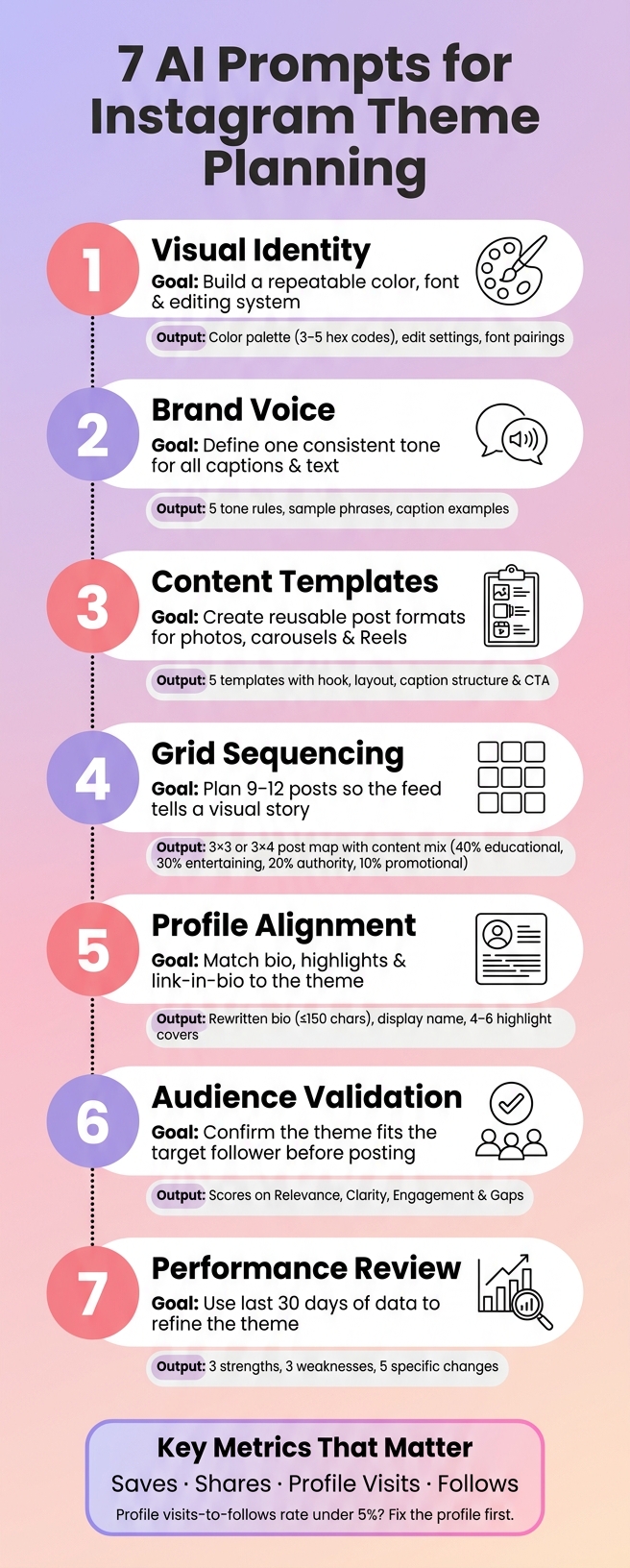
Below is a quick view of what each prompt helps you do.
| Prompt area | What I’d use it for | Main output |
|---|---|---|
| Visual identity | Set the look of the account | Color palette, edit settings, fonts |
| Brand voice | Set how the account sounds | Tone rules, sample phrases, caption examples |
| Content templates | Make posting easier | Reusable layouts and caption flows |
| Grid sequencing | Plan feed order | A 3x3 or 3x4 post map |
| Profile alignment | Match the profile to the feed | Bio edits, highlight ideas, link text |
| Audience validation | Test fit before posting | Gaps, scroll-past risks, topic fixes |
| Performance review | Improve next month | Strengths, weak spots, and changes |
The main idea is simple: I’d use AI to turn scattered post ideas into one system I can reuse each month, then adjust it based on what the numbers say.
7 AI Prompts for Instagram Theme Planning: A Complete System
1. Visual identity
Goal: Build a visual system you can use again and again for colors, edits, fonts, and imagery.
First, set the visual rules that everything else will follow.
Pick a repeatable system for colors, edits, fonts, and imagery. Stick with 3–5 main colors and one consistent editing style so your feed feels connected at a glance.
You can also use free AI-powered Instagram tools to generate content ideas. Copy and paste this prompt:
"Act as a brand designer for Instagram. I run an account for a [niche, e.g., 'Los Angeles-based vegan food blogger targeting women ages 25–34 in the U.S.']. Suggest a cohesive visual identity for my Instagram theme. Provide: 1) a 3–5 color palette with hex codes plus 1–2 neutrals for backgrounds; 2) an editing style I can apply in Instagram, Lightroom Mobile, or both, including brightness, contrast, saturation, and warmth; 3) font pairings for posts and Story covers; 4) three post examples that match this style. Use en-US spelling."
Then save the hex codes, editing settings, and font choices as a reusable style kit in Canva, Adobe Express, or Lightroom Mobile.
That way, you’re not starting from scratch every time you post. Your visuals stay steady, your design work gets easier, and your account starts to look like it belongs to one clear brand.
Once the visuals are set, match them with a consistent caption voice.
sbb-itb-3c55afb
2. Brand voice
Goal: Define one tone and language style for captions, bios, replies, and Story text.
Once your visuals are locked in, your voice is what keeps the whole account feeling consistent in text. It should match your values, your audience, your visual style, and the kind of content you post.
Copy and paste this prompt:
"Create a brand voice guide for my Instagram account about [niche]. My target audience is [audience], and my brand values are [values]. The tone should feel [preferred tone adjectives]. Include: 1) 5 tone rules I can follow for every post; 2) 5 phrases or sentence starters to use; 3) 5 phrases to avoid; 4) guidance on emoji use and how the voice should shift across feed posts, Reels captions, Stories, and bios; 5) two sample captions that match this voice. For more inspiration, check out these proven Instagram caption ideas. Use en-US spelling."
The more specific you are, the better the result tends to be. Add clear inputs, plus examples of brands, creators, and phrases you don’t want. If you only use broad adjectives, AI can easily take them the wrong way.
Save the output as a mini style guide. Focus on tone, word choice, emoji use, and caption length.
Then use that voice to build repeatable content templates.
3. Content templates
Goal: Build reusable post formats that keep your grid steady, so you’re not reinventing the wheel every week.
Take your Instagram aesthetic and brand voice and turn them into repeatable post templates. A good template covers both the design layout and the caption flow, so you already know what goes where each time you publish.
Copy and paste this prompt:
"You are an Instagram content strategist. Create 5 reusable post templates for my account about [niche]. My audience is [audience], my brand voice is [tone], my visual style is [colors, fonts, layout], my posting frequency is [frequency], and my goals are [saves/shares/follows/DMs]. For each template, include: 1) post type (photo, carousel, or Reel); 2) a hook line under 125 characters; 3) suggested image layout or slide breakdown; 4) caption structure (hook → value → CTA); and 5) caption CTA. Include a mix of educational, engagement, and promotional templates. Use en-US spelling."
Be sure to add your content pillars and the action you want people to take. The more context you give, the easier these templates are to use later.
Once the templates are ready, save them in a doc or your content calendar. Then, each week, choose three formats and batch-design them in one tool as reusable frames. That way, each post has its place in the grid, and your process gets a lot less messy.
4. Grid sequencing
Goal: Plan the order of your posts so your feed tells a clear visual story instead of looking random.
Once you have your templates, the next step is to arrange them with intent. Your feed should look clean at first glance, not like a pile of disconnected posts. A simple way to do that is to map your next 9-12 posts in advance so the profile reads like one visual story.
Copy and paste this prompt:
Act as an Instagram strategist for a [your niche] account targeting [your audience]. Plan a 12-post sequence whose first 9 posts form a cohesive 3x3 grid and smooth feed flow. Mix different types of Instagram content like static posts, carousels, and Reels covers using my brand colors: [list]. For each post, specify type, topic, and main visual (photo, text tile, or Reel cover) and note how it connects to the posts before and after it.
Want the sequence to feel more planned out? Add a few constraints. Share your posting frequency, your audience's time zone, and your content mix. For example:
- 40% educational
- 30% entertaining
- 20% authority-building
- 10% promotional
That extra detail helps the AI build a schedule that fits how you post. If you publish three times a week, say that directly. Then the 12 posts can be mapped across four weeks instead of being pushed into a daily pace that doesn't fit your routine.
You can also ask it to:
- put high-impact hook posts in the top row and center tile
- make each row feel like its own mini-theme
Before you start designing, sketch the sequence in a 3x4 grid. That quick step makes it much easier to spot gaps, repeated visuals, or posts that feel out of place.
5. Profile alignment
Goal: Make sure your bio, profile photo, name, username, highlights, and link-in-bio match the theme you've built so far.
Your bio, profile photo, highlights, and link-in-bio should work together so the profile feels like one brand.
Once you've set your colors, voice, templates, and post sequence, bring your public profile in line with that system. Think of your profile as the front door to your theme.
Here’s the prompt to use:
Act as an Instagram brand strategist. I'm planning a cohesive Instagram theme and I want my profile to match it. Here's my info: Brand/theme summary: [paste]. Target audience (U.S.-based): [age, gender, interests, key problems]. Visual direction (colors, mood, example adjectives): [paste]. Brand voice (tone, formality, personality): [paste]. Main goal (e.g., email signups, product sales, bookings): [paste]. Current profile elements: [bio], [display name], [username], [profile photo], [highlight names], [link-in-bio text], [button labels].
- Rewrite my bio in clear, compelling U.S. English that matches my brand voice and Instagram theme. Limit to 150 characters if possible.
- Suggest a searchable display name and username with 1–2 U.S. keywords.
- Recommend the style and subject for my profile photo that fits my theme, including background, colors, outfit, and facial expression.
- Propose 4–6 highlight titles and cover styles that use my color palette and reinforce my theme.
- Rewrite my link-in-bio text and buttons to support my main goal.
- Give a short checklist to keep new posts lined up with my profile.
If you want specific edits, paste your current bio and highlight names. That gives the AI something concrete to work with instead of vague brand advice.
Write the bio like a landing page: say who you help, what sets you apart, and include one clear CTA. If your profile visits-to-follows rate is below 5%, that’s often a profile or bio issue, not a content issue.
Next, check whether this theme matches the audience you want to attract.
6. Audience validation
Goal: Make sure your planned theme fits the people you want to attract before you lock in a month of posts.
Once your Instagram profile lines up with your theme, check the next piece: does the theme line up with the follower you want? You’re looking for fit across the whole package - visuals, topics, and caption tone. Put your colors, cover design, captions, and content mix in front of your target follower and see if it all feels like it belongs together.
Here’s the prompt to use:
Act as my ideal Instagram follower: a [age range]-year-old [describe lifestyle, job, or situation] based in the United States who wants [main goal] but struggles with [key pain point]. My 30-day theme: Visual style: [describe colors, mood, format mix]. Content pillars: [list 3–4 topics]. Caption tone: [direct, educational, casual, etc.]. Posting schedule: [X posts per week].
Score this theme on four points:
- Relevance - Does this solve my main problem?
- Clarity - Is it easy to understand on mobile?
- Engagement - Would I follow, save, or share this?
- Gaps - What would make me scroll past?
Suggest specific improvements to topics, visuals, or tone to better fit this persona.
The more specific your persona is, the better the feedback gets. A vague follower gives vague answers. A clear one gives you something you can actually use. So instead of saying “busy women” or “new business owners,” get concrete: age, job, city or region, and what a normal day looks like.
For example, “32-year-old marketing manager in Chicago who checks Instagram on the train and during lunch” gives you much better input than “professional woman in the U.S.” That kind of detail changes everything - what catches their eye, how much text they’ll read, and what tone feels right.
Use that feedback to adjust the theme before you move to performance review.
7. Performance review
Goal: Use data from your last 30 days to decide what to keep, adjust, or drop from your theme going into next month.
Once your theme lines up with your audience, the next step is simple: check your Instagram metrics. Look at the last 30 days and use that data to decide what stays, what needs work, and what should go.
Here’s the prompt to use:
Analyze my last 30 days of Instagram posts using this performance data: [paste reach, likes, comments, saves, shares, profile visits, and follows per post].
Tag each post by: content type (carousel, Reel, static), caption tone (educational, personal, promotional), and visual style (color palette, layout).
Then tell me:
- 3 strengths of my current theme based on what consistently performed well
- 3 weaknesses based on what consistently underperformed
- 5 specific changes for next month - covering grid layout, caption style, and content mix - to improve real follower growth and saves
Don’t give every metric the same weight. Put saves, shares, profile visits, and follows first. Those numbers tell you whether people found the post useful enough to keep, pass along, or act on.
A post with lots of likes can look good on the surface. But if it leads to few saves, few shares, and no follower growth, it may be getting attention without driving action. That’s the difference that matters.
To spot patterns, compare your top 25% of posts with your bottom 25%. Look for repeat behavior across both groups:
- Which content types got more saves and shares
- Which caption tones led to more profile visits and follows
- Which color palettes, cover styles, or layouts showed up most often in your top posts
Pay close attention to whether your colors, caption tone, cover style, and post mix are pushing people to save and follow. In most cases, saves and shares matter more than likes because they point to usefulness, not just scroll-stopping appeal.
Use what you find to tighten up next month’s colors, captions, formats, and post order.
Conclusion
These seven prompts give you a repeatable system for planning your colors, voice, layout, bio, audience fit, and monthly updates.
The big win comes when you come back to them on a set schedule.
Treat theme planning as a monthly process, not a one-time job. Look at what drives saves, shares, and follows, then track and measure your success by adjusting your theme based on what the numbers show. Keep the whole system in one place so it’s easy to use again without digging around.
Save the prompts in one doc or board and group them by purpose. Then review them at the start and end of each month. Feed your analytics back into the prompts so each round is based on actual performance data. That monthly habit helps keep your theme consistent and your content focused.
FAQs
How detailed should my AI prompt be?
Your prompt should be detailed, not vague. Spell out the purpose of the content, who it’s for, the tone you want, and what the piece needs to do.
Add the nuts and bolts too: target length, format, emoji use, and any calls to action. The more specific you are, the easier it is for the AI to give you something that sounds on-brand and needs less cleanup.
How often should I update my Instagram theme?
Update it over time as your brand shifts and trends change. There’s no need to redo everything in one shot. A simple 80/20 approach works well: keep 2–3 core elements the same, then tweak the rest around them.
A solid rhythm is a monthly theme check-in. For visual assets like highlight covers, refresh them every 3–4 months, or seasonally, about 2–4 times per year, based on how they’re performing.
What metrics matter most when reviewing my theme?
Focus on metrics that show interest and conversion, not just views.
Pay close attention to net follower growth across 30- to 90-day windows, along with engagement, especially saves, shares, and comments. Those numbers tell you a lot more than raw reach ever will.
It also helps to track profile actions, like:
- Profile visits
- Website taps
- Bio link click-through rates
- Non-follower reach
- Reel completion rates
These metrics show whether your theme is pulling in the right audience and leading to meaningful interaction.