
Table of contents
- How to Track Your Hashtag: Hashtag Tracker Tools & 4 Important Hashtag Metrics | #ChiaExplains
- Quick Comparison
- Quick Comparison: All 7 Tools at a Glance
- 1. Metricool Hashtag Tracker
- 2. Sprout Social
- 3. RiteTag
- 4. Display Purposes
- 5. Meta Hashtags
- 6. Keyword Tool
- 7. Hootsuite Trending Hashtags
- Which Tool Fits Your Needs
- Final Take
- FAQs

If I had to cut this down to one line, it’s this: for live hashtag checks, I’d look at RiteTag or Metricool first; for team reporting, I’d lean toward Sprout Social or Hootsuite; and for free research, I’d start with Meta Hashtags or Display Purposes.
Here’s the short version of what matters in this list:
- I’m looking at 7 tools
- I’m comparing live trend data, filters, alerts, location tracking, pricing, and free plans
- Only a few tools focus on right-now hashtag movement
- Some are better for pre-post checks
- Others fit agencies and brand teams that need reports and shared access
A few numbers stand out right away:
- Sprout Social starts at $199/user/month
- Metricool paid plans start at $22/month
- Meta Hashtags and Display Purposes both offer a free entry point
- Hootsuite’s trending-hashtags feature is listed as free, while other platform features may cost extra
If you want the plain-English takeaway:
- Best for fast checks before posting: RiteTag
- Best free options: Meta Hashtags and Display Purposes
- Best for teams: Sprout Social and Hootsuite
- Best for search-led hashtag ideas: Keyword Tool
- Best for short campaign windows: Metricool
How to Track Your Hashtag: Hashtag Tracker Tools & 4 Important Hashtag Metrics | #ChiaExplains
sbb-itb-3c55afb
Quick Comparison
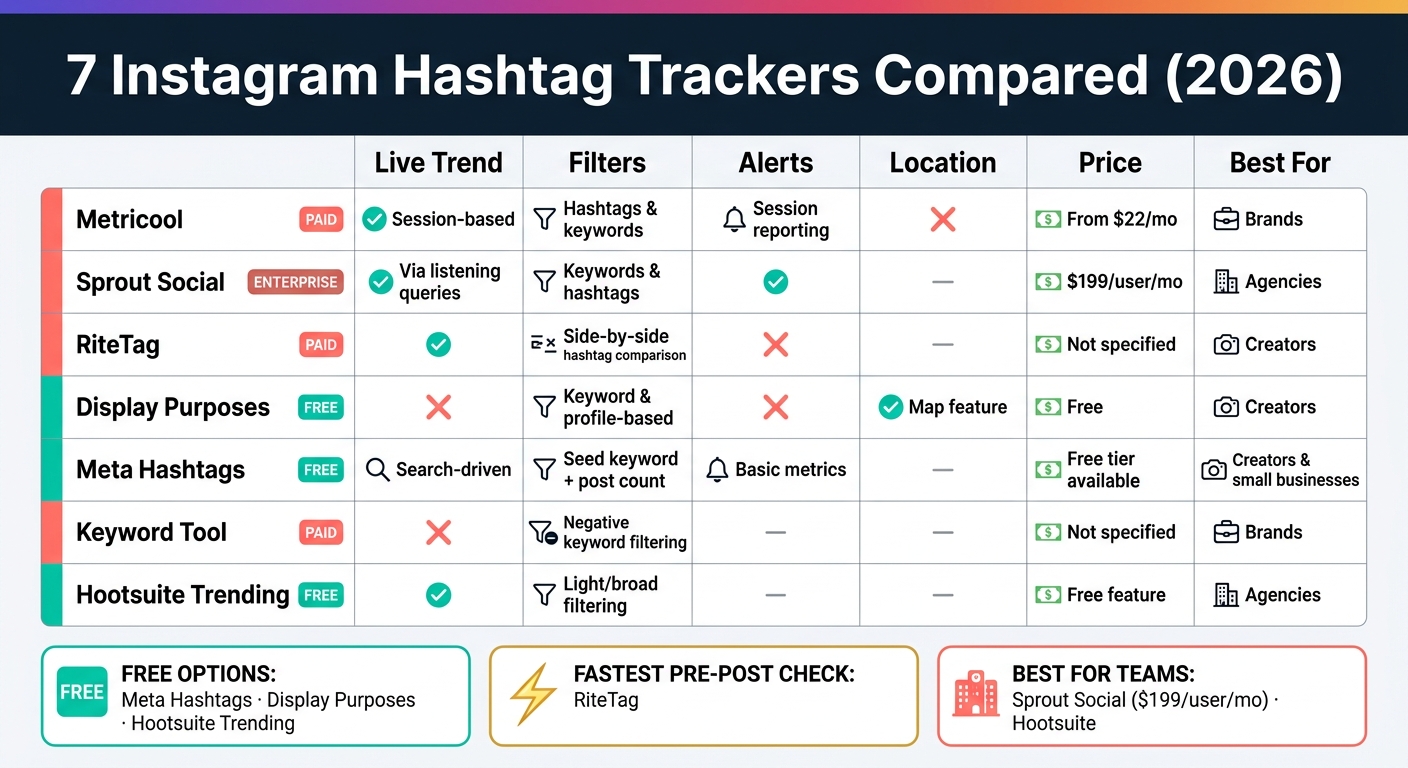
7 Instagram Hashtag Trackers Compared: Features, Pricing & Best Use (2026)
| Tool | Best Use | Live Trend View | Filters | Alerts | Location Tracking | Starting Price |
|---|---|---|---|---|---|---|
| Metricool | Short campaign tracking | Yes, session-based | Hashtags and keywords | Session reporting | No | $22/month |
| Sprout Social | Team reporting | Yes, via listening queries | Keywords and hashtags | Not clearly listed | Not specified | $199/user/month |
| RiteTag | Pre-post hashtag checks | Yes | Side-by-side hashtag checks | No | Not specified | Not specified |
| Display Purposes | Free hashtag filtering | No | Keyword/profile-based filtering | No | Yes | Free |
| Meta Hashtags | Free search-based research | Search-driven, not live-feed based | Seed keyword + post count filters | Basic metrics, no alert focus | Not specified | Free |
| Keyword Tool | Search-term-based discovery | No | Negative keyword filtering | Not specified | Not specified | Not specified |
| Hootsuite Trending Hashtags | Shared team review | Yes | Light filtering | Not specified | Not specified | Free feature |
Bottom line: I’d choose based on workflow, not hype: free research, pre-post checks, or team reporting. That’s the simplest way to sort these 7 options before digging into the details. You can also learn how to find and use the best hashtags to maximize your reach.
Quick Comparison: All 7 Tools at a Glance
Use the table below for a quick scan of each tool’s strengths, pricing, and best fit.
| Tool | What It Does Best | Price | Free Plan | Alerts | Location Tracking | Best Fit |
|---|---|---|---|---|---|---|
| Metricool | Live hashtag tracking and reporting | - | - | - | - | Brands |
| Sprout Social | Enterprise-grade social listening and team reporting | $199/user/mo | - | ✓ | - | Agencies |
| RiteTag | Real-time hashtag velocity checks | - | - | - | - | Creators |
| Display Purposes | Fast hashtag filtering | - | - | - | - | Creators |
| Meta Hashtags | Free native hashtag and keyword insights | Free | ✓ | - | - | Creators and small businesses |
| Keyword Tool | Keyword-led hashtag discovery | - | - | - | - | Brands |
| Hootsuite Trending Hashtags | Team reporting and collaboration | - | - | - | - | Agencies |
Some tools focus on live hashtag velocity. Others lean more into social listening, search-driven discovery, or free native analytics.
Here’s the short version: RiteTag is best for fast velocity checks, Meta Hashtags is the free native option, and Sprout Social plus Hootsuite make more sense for teams that need reporting and collaboration. Keyword Tool fits best when your process starts with search terms.
The sections below break down how each tool handles live trends, filters, alerts, location tracking, and pricing.
1. Metricool Hashtag Tracker
Metricool uses live, time-boxed hashtag tracking. That makes it a good fit when you need up-to-the-minute data during a set campaign period, not just a general look at hashtag activity.
Live Trend Feed
Metricool tracks hashtag trends while a session is active, so you can see what’s moving during that exact window.
Keyword and Hashtag Filters
Before tracking starts, you can pick the hashtags or keywords you want to watch. That keeps the session focused on the terms that matter to your campaign.
Alerts and Reporting
Metricool shows campaign performance while the tracking window is active. You can then use that session data to review performance during the live tracking period.
Location Tracking and Pricing
Metricool does not offer location-based hashtag filtering. To use the real-time tracker, you must connect both an Instagram Business or Creator account and an X (formerly Twitter) account. The X connection is mandatory because Metricool uses X's API to power the live data stream. It also includes duration controls, so you can set the exact timeframe for each session.
- Price: Free plan available; paid plans start at $22/mo
- Free plan: Yes
- Best for: Brands running short, campaign-specific hashtag checks
Next, Sprout Social covers a broader listening setup with stronger team reporting.
2. Sprout Social
For teams that need reporting that goes past a single campaign, Sprout Social is a step up. It’s an enterprise social listening platform built for brands and agencies that want detailed reporting, not just a quick look at what’s trending.
Its customizable dashboards make that pretty clear. Sprout Social leans more toward a reporting-first tracker than a simple trend monitor.
Live Trend Feed
Sprout Social tracks hashtag trends through social listening queries.
Keyword and Hashtag Filters
Teams can narrow what they monitor by keyword and hashtag.
Alerts and Reporting
The platform pairs customizable dashboards with deep reporting, which helps teams build client-ready reports and show ROI. Alerts are not called out in the available details.
Location Tracking and Pricing
Location tracking is not specified.
- Price: Starts at $199 per user per month
- Free plan: No
- Best for: Agencies and enterprises that need reporting and multi-user collaboration
Next, RiteTag focuses on faster, more granular hashtag velocity checks.
3. RiteTag
RiteTag is built for pre-publish hashtag checks. If you want a fast read before a post goes live, this is where it fits.
Live Trend Feed
RiteTag looks at hashtags in real time and sorts them into high-velocity and steady-growth groups. That gives you a quick way to pick tags based on current engagement signals, whether you want fast reach or more gradual discovery using Instagram growth strategies.
Keyword and Hashtag Filters
You can compare several hashtags side by side before publishing. And the browser extension lets you check hashtags inside your normal workflow, so you don't have to jump between tabs or tools.
Alerts and Reporting
RiteTag is made for pre-publish checks, not alerts or long-term reporting.
Location Tracking and Pricing
Location tracking: Not specified.
- Price: Not specified
- Free plan: Not specified
- Best for: Creators and social managers who need fast pre-publish hashtag checks
Next, Display Purposes focuses on faster hashtag filtering.
4. Display Purposes
Display Purposes is a free Instagram hashtag tool that helps you find relevant tags fast.
Live Trend Feed
This isn't a live tracker. Display Purposes is built for pre-publish research, not real-time trend spotting.
Instead, it suggests hashtags based on tags that often show up alongside your keyword or profile context. That makes it more useful for relevance than for real-time momentum.
Keyword and Hashtag Filters
Type in a keyword or an Instagram profile, and Display Purposes will generate a list of hashtags tied to your niche.
One of its best features is the filtering. The tool removes banned, spammy, and overly generic tags like #love or #food that can hurt your reach. Using clean, relevant tags is a key part of growing your followers organically.
Location Tracking and Pricing
- Price: Free
- Free plan: Yes
- Location tracking: Yes, via the Map feature
- Best for: Creators and small teams that need fast, no-cost hashtag research
Next, Meta Hashtags takes a more native, search-driven approach.
5. Meta Hashtags
Unlike the previous tool, Meta Hashtags leans on search-based discovery and simple tag metrics.
Meta Hashtags is a search-driven Instagram hashtag tool that helps you find related tags and check basic performance data before you publish.
Live Trend Feed
Meta Hashtags pulls from real-time Instagram search data to show related hashtag ideas. That makes it a better fit for fast discovery than for watching a live hashtag feed.
Keyword and Hashtag Filters
Start with a seed keyword, and the tool generates related tags. From there, you can filter by post count to spot lower-competition options.
Alerts and Reporting
The free tier gives you unlimited searches and basic metrics, including average likes and comments per tag. Paid plans add deeper performance and engagement data.
Location Tracking and Pricing
- Location tracking: Not specified
- Price: Free tier available; paid plans for advanced analytics
- Free plan: Yes - unlimited searches with basic metrics included
- Best for: Creators and brands focused on niche hashtag research and low-competition tags
Next, Keyword Tool shifts hashtag discovery from tags to search terms.
6. Keyword Tool
For search-led discovery, Keyword Tool helps you build hashtag lists based on actual Instagram search behavior and algorithm patterns. Keyword Tool (keywordtool.io) pulls Instagram hashtag ideas from autocomplete, then lets you trim out terms that don't fit.
Live Trend Feed
No live trend feed is described. Keyword Tool is built for search-led hashtag discovery.
Keyword and Hashtag Filters
This is where Keyword Tool shines. Its Negative Keywords feature lets you exclude specific terms and remove irrelevant hashtag suggestions, so your list stays tight and on-topic for a niche or campaign.
For example, a luxury brand could filter out words like "free" or "cheap" to keep suggestions aligned with its brand image.
Alerts and Reporting
Not specified.
Location Tracking and Pricing
- Location tracking: Not specified.
- Price/free plan: Not specified.
- Best for: Brands and marketers building niche hashtag lists with precise keyword control.
Next, Hootsuite adds team-focused trending hashtag monitoring.
7. Hootsuite Trending Hashtags
Hootsuite is an enterprise social media platform that includes an Instagram trending-hashtags feature for fast discovery.
Live Trend Feed
Hootsuite shows trending hashtags in real time, so teams can get a quick look at what's picking up speed. That's handy for agencies and social teams juggling multiple client accounts, especially when they need a shared view of hashtags without slowing down the workflow.
Keyword and Hashtag Filters
Hootsuite works better for broad trend scanning than deep filtering. It's a good fit when your team needs a fast shortlist of hashtags, not a close tag-by-tag breakdown.
Alerts and Reporting
For teams, the main drawback is simple: this feature is built for scanning, not long-term alerting. Alerts and reporting are not specified for the trending-hashtags feature, so it's better for quick discovery than steady monitoring.
Location Tracking and Pricing
- Location tracking: Not specified.
- Price/free plan: The trending-hashtags feature is free; paid plans apply to Hootsuite's broader platform.
- Best for: Agencies and social teams that need quick, shared hashtag review.
Use it when your team needs fast hashtag review inside a broader social workflow.
Which Tool Fits Your Needs
Pick the tool that lines up with how you work and what you want to spend.
If you're a solo creator, start with organic Instagram growth strategies and keep things simple. Meta Hashtags and Display Purposes are both free. Meta Hashtags works well when you want search-based tag ideas. Display Purposes is a better pick when you want to filter out spammy tags fast.
For in-house brand teams, trend checks usually aren't enough. You may need reporting that goes deeper, especially if you're sharing results with other teams or leadership. In that case, Metricool or Sprout Social make more sense. Sprout Social starts at $199/user/mo, which puts it in the enterprise reporting camp.
If you run an agency with several Instagram clients, you'll want a tool built for juggling many accounts without making a mess. Hootsuite and Sprout Social stand out here, mainly for multi-account views and reports you can export and hand off.
| Use Case | Best Fit | Starting Price |
|---|---|---|
| Solo creators | Meta Hashtags or Display Purposes | Free |
| Brand teams | Metricool or Sprout Social | $199/user/mo |
| Agencies | Hootsuite or Sprout Social | Not specified |
Use this shortlist to narrow things down before the final take.
Final Take
These seven tools fit into three clear use cases: free options for basic hashtag research, broader Instagram marketing strategies, fast checks before you publish, and paid platforms for team reporting and collaboration.
If you need a quick call right before posting, RiteTag stands out. Its real-time velocity data helps you see whether a hashtag is more likely to bring immediate exposure or slower, steadier growth. And because the browser extension works in your current tab, you can check tags without breaking your flow.
If your team needs steady monitoring, move to Sprout Social or Hootsuite. Sprout Social is the best fit for team reporting and social listening, but pricing starts at $199 per user per month. Hootsuite makes more sense for large agencies handling many high-volume accounts from one dashboard.
For solo creators, the easiest path is to start with free tools like Meta Hashtags or Display Purposes. Then move up only when you need reporting or collaboration. The simplest way to choose is by workflow: free research, fast checks, or team reporting.
FAQs
Which tool is best for live Instagram hashtag tracking?
RiteTag stands out for live Instagram hashtag tracking because it gives you real-time, color-coded engagement scores and live metrics. That makes it easier to spot trending hashtags right away and separate them from tags that work better for longer-term reach.
Inflact gives you real-time hashtag analytics updates. Tagembed tracks live hashtag feeds for campaigns. UpGrow offers an AI-powered dashboard with real-time engagement and growth tracking.
Do I need a paid plan to track Instagram hashtags?
No. You can track Instagram hashtags with free tools.
For example, Instagram Insights for Professional or Creator accounts shows impressions from hashtags. That gives you a simple way to see whether your tags are helping people find your posts.
UpGrow also offers 23 free AI-driven tools, including a hashtag generator. Paid platforms may give you deeper historical data and automated tracking. But free tools can still help you measure hashtag performance well.
How do I choose the right hashtag tracker for my workflow?
Start with your goals. Maybe you want more followers, better reach, or a simpler way to handle several client accounts. That part matters because the right tool for a personal profile can be a poor fit for an agency setup.
It also helps to test free plans or trials before you commit. That gives you a feel for how the tool works day to day, from content scheduling to analytics dashboards. A platform can look great on a sales page and still feel clunky once you’re inside it.
For personal accounts, put real-time analytics and AI-powered targeting at the top of your list. Those features help you spot what’s working while your posts are still gaining traction.
If you’re handling multiple accounts, shift your focus to bulk management, custom reporting, and official Instagram API support. Those are the features that save time, keep client work organized, and make reporting a lot less painful.


