Table of contents
- Use This NEW Hashtag Strategy To Go VIRAL on Instagram in 2026 (HUGE CHANGES)
- Quick Comparison
- Low Hashtag Density: When 3 to 5 Tags Work Best
- High Hashtag Density: When 10 to 30 Tags Still Get Tested
- Low vs High Hashtag Density by Post Type, Account Size, and Growth Goal
- How to Test Hashtag Density Using Analytics and UpGrow
- FAQs

Use fewer hashtags by default. In 2026, 3 to 5 relevant hashtags usually beat big 20-to-30-tag blocks for engagement quality, niche reach, and lower spam risk.
If I had to simplify the whole article into one takeaway, it would be this:
- 3–5 hashtags work best for most posts
- 5–8 hashtags can make sense on feed posts when I want more discovery
- 8–12 hashtags are mostly for testing, often on smaller accounts
- 20–30 hashtags are rarely worth using as a default
- For Reels, watch time matters more than hashtag count
- For Stories, hashtags usually have limited impact, especially under 50,000 followers
The article also makes a clear case with numbers:
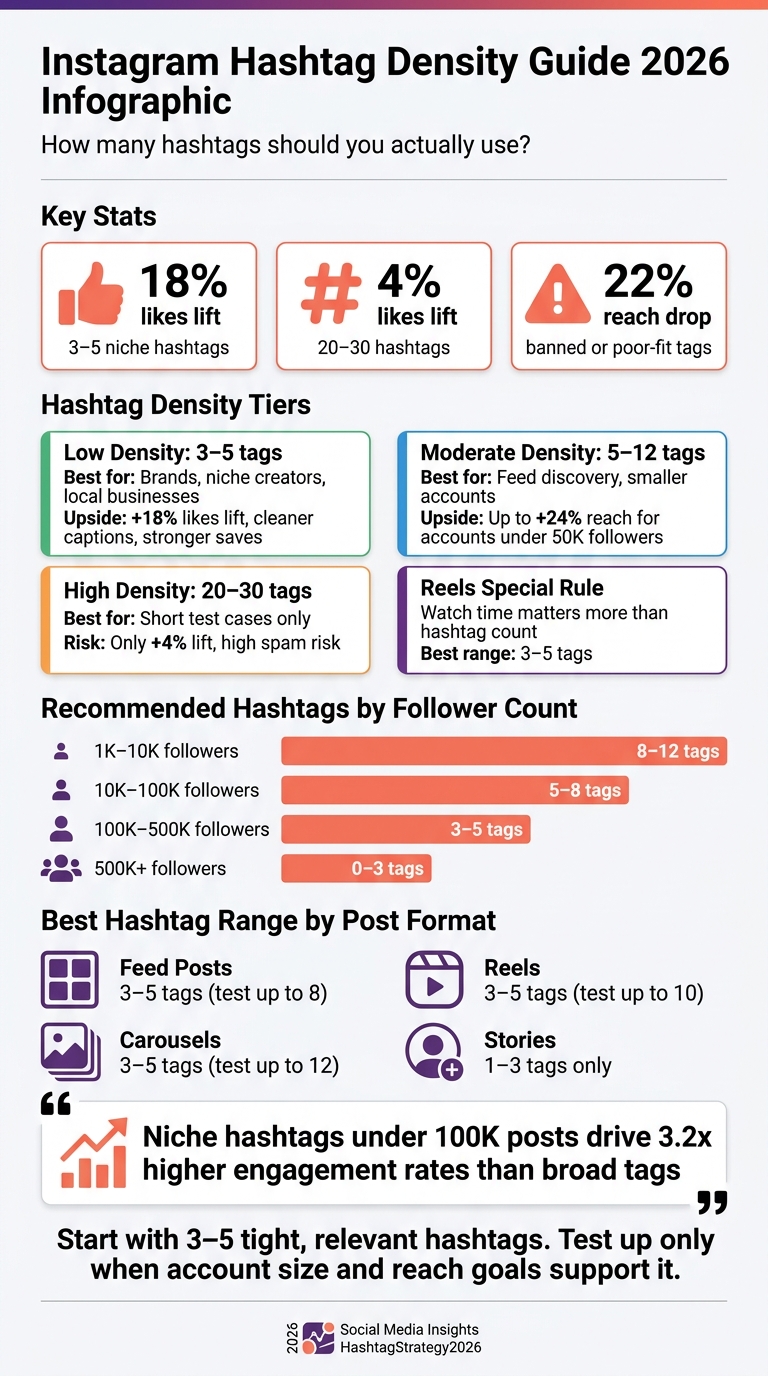
- Posts with 3–5 niche hashtags saw an 18% likes lift
- Posts with 20–30 hashtags saw only a 4% lift
- Using banned or poor-fit tags can cut reach by 22%
- For accounts under 50,000 followers, 8–12 hashtags may increase reach by about 24%
- Niche hashtags under 100,000 posts can drive 3.2x higher engagement rates
If you want the short answer: low-density hashtags fit most accounts, while moderate testing can help smaller pages that need more reach. High-density hashtag blocks now look weaker, cluttered, and more likely to send low-quality signals.
Instagram Hashtag Density: Low vs High – Key Stats & Best Practices 2026
Use This NEW Hashtag Strategy To Go VIRAL on Instagram in 2026 (HUGE CHANGES)
sbb-itb-3c55afb
Quick Comparison
| Approach | Best Range | Best For | Main Upside | Main Risk |
|---|---|---|---|---|
| Low density | 3–5 tags | Brands, niche creators, local businesses, established accounts | Better topic match, cleaner captions, stronger save/follow quality | May limit reach if I never test beyond a small set |
| Moderate density | 5–12 tags | Feed post discovery, smaller accounts, controlled tests | Can help non-follower reach when every tag fits | Weak tags can hurt relevance |
| High density | 20–30 tags | Short test cases only | Small upside in some cases | Higher spam risk, weak relevance, messy presentation |
So if I were setting a starting point today, I’d keep hashtags tight, specific, and few, then test up only when the account size, post type, and reach goal support it. For more ways to scale, check out these Instagram growth tips.
Low Hashtag Density: When 3 to 5 Tags Work Best
Using fewer hashtags works best when every tag pulls its weight. If each one lines up with the post’s topic, audience, or location, Instagram gets a cleaner signal about what the content is about. That kind of precision helps the platform place the post in more relevant discovery paths in 2026. It matters most when the post already has a clear, easy-to-read topic.
Reach patterns, engagement quality, and spam risk
A small group of relevant hashtags tends to create narrower, higher-intent reach. Instead of putting your post in front of a broad mix of random users, 3 to 5 tightly chosen tags help it show up in niche searches and topic feeds where people are more likely to care. That often leads to better engagement quality: more saves, more profile visits, and more comments from users who are actually interested in the post.
There’s also a clear difference in spam risk. A short tag set looks more natural and lowers the chance of looking spammy. Low density works best for relevance. High density can expand reach, but only if every tag is still a close match.
Best post types and account sizes for low-density tagging
Low-density tagging works best when the content already says most of what needs to be said, and hashtags are there to back it up. Feed posts, carousels, and many Reels are strong fits, especially for niche, educational, local, or brand-led content. Stories rely less on hashtags than feed posts or Reels.
Carousels are a strong match in particular because they already tend to drive saves, with a 1:8 saves-to-likes ratio. In that setup, a few precise tags can support the post without making the caption feel cluttered.
This approach tends to work best for established accounts, niche creators, local U.S. businesses, and brands with consistent content. Smaller accounts can use it too. But it usually works better when they already have a defined niche and a repeatable content format. If the content feels scattered, broader testing often makes more sense.
Growth goals that fit a low-density approach
This setup fits goals like brand positioning, local reach, cleaner presentation, and community growth. In these cases, the content itself does most of the work, while hashtags act as a supporting signal instead of the main driver. It also makes sense for brands that want posts to feel polished and intentional, not like they’re chasing the algorithm.
For local discovery, a simple tag mix can work well:
- One topic tag
- One audience tag
- One niche subtopic tag
- One location tag, if it fits
- One branded tag
Using the same tag structure across similar posts can help Instagram learn your topic faster. When you want more exposure, that’s the point where higher-density tagging becomes worth testing.
High Hashtag Density: When 10 to 30 Tags Still Get Tested
If low-density tagging is about precision, high-density testing is about volume. In 2026, that volume-first approach only makes sense in a few narrow cases. High-density tagging used to work better because Instagram relied much more on hashtag signals. That edge is a lot weaker now.
Past reach gains vs current algorithm drawbacks
Instagram now looks at a mix of content signals: visual context, caption keywords, audio transcription, and interaction patterns. So it’s not just counting tags anymore.
What does that mean in practice? loosely related hashtags don’t do much, so using an AI hashtag generator is essential for relevance. Posts with 3 to 5 niche hashtags get an average likes lift of 18%, while posts with 20 to 30 hashtags get only a 4% lift compared with posts that use no hashtags. And if banned or shadow tags slip in, reach can fall by 22%.
| Strategy | Historical Reach Upside | Current Risk Level (2026) | Fit for 2026 Growth Goals |
|---|---|---|---|
| 8–15 tags | Solid discovery for small accounts | Moderate: safe if tightly relevant | Situational: works with strong relevance and analytics tracking |
| 20–30 tags | Occasional reach spikes on older algorithms | High: likely to trigger spam classification | Low fit: better reserved for short experiments |
Which post types and smaller accounts may still test high density
Smaller accounts can still test 10 to 20 tightly related tags on feed posts when reach is weak. But there’s a simple filter here: Would this post satisfy someone searching that hashtag? If the answer is no, the tag probably shouldn’t be there.
Reels and Stories usually need fewer tags. So high-density tagging works better as a short test than as your standard playbook.
Use it only when the post itself and the account’s stage make broader testing worth it.
When high-density tagging does not fit the goal
If you’re running a brand where presentation and trust matter, a big block of hashtags can make the caption feel messy and spammy. That can hurt with both the algorithm and the audience.
High-density tagging fits short tests. It does not fit a default posting setup.
Next, compare hashtag density by post type, account size, and growth goal to see which option makes sense in each case.
Low vs High Hashtag Density by Post Type, Account Size, and Growth Goal
Side-by-side comparison for feed posts, Reels, and Stories
A 2026 analysis of 2.5 million Instagram posts found a clear pattern by format. Feed posts peaked at 5–8 hashtags for non-follower reach. Reels peaked at 3–5 hashtags. Stories showed little discovery lift for accounts under 50K followers. Start with those baselines, then check your analytics to see what holds up for your account.
| Format | Low-Density Default | Test Range | Reach Pattern | Risk |
|---|---|---|---|---|
| Feed Posts | 3–5 highly relevant tags | 5–8 tags when testing discovery | Solid baseline reach, with moderate sets sometimes improving non-follower reach | Too many tags can weaken relevance and invite spam signals |
| Carousels | 3–5 niche tags | 8–12 tags when reach is the goal | Medium reach with strong save signals | Over-tagging can dilute topic clarity |
| Reels | 3–5 highly relevant tags | 5–10 tags if every tag fits tightly | Strongest reach potential; watch time and content quality matter most | Large tag stacks add little and can look spammy |
| Stories | 1–3 subtle tags | Rarely worth more than 1–3 tags | Mostly follower-facing; discovery lift is limited | Too many tags clutter the Story and are easy to ignore |
For Reels, watch time and content quality matter more than hashtag count. That’s the big thing to remember here. A Reel with weak retention won’t be saved by piling on extra tags.
How account size affects the right hashtag density
Account size changes what hashtags can do. Smaller accounts have less built-in reach, so hashtags matter more during early discovery. Bigger accounts already have stronger audience signals, which means hashtags play more of a supporting part.
| Follower Band | Recommended Approach |
|---|---|
| 1K–10K | Test 8–12 tightly relevant tags when discovery matters |
| 10K–100K | Use 5–8 niche tags to balance reach and precision |
| 100K–500K | Stick to 3–5 tags; relevance and consistency matter most |
| 500K+ | Use low-density or even no hashtags; Reels and audience signals drive reach |
How to choose the right hashtag strategy for growth in 2026
The right density comes down to three things: your goal, your current account size, and what your analytics show.
Use low-density (3–5 tags) when you want better engagement quality, stronger niche positioning, or steady brand consistency. Niche hashtags with under 100K posts generate about 3.2x higher engagement rates than broad tags. That usually means better comments, saves, and shares, not just surface-level likes.
Test moderate density (8–12 tags) when discovery is the main goal and your account is still building reach. Posts with 8–12 hashtags can deliver about a 24% reach increase versus baseline for accounts under 50K followers. The rule is simple: every tag should match the post, the topic, or the audience. Skip generic tags like #instagood and avoid stuffing tags just to hit a number.
Avoid high-density (20–30 tags) as your default setting. Posts in that range see only a 4% likes lift, compared with an 18% lift from 3–5 niche tags. The spam-classifier risk is also much higher.
Use your analytics to compare these baselines against your actual reach, saves, and follows.
How to Test Hashtag Density Using Analytics and UpGrow
What metrics to track when comparing 3 to 5 tags vs broader sets
To compare hashtag density the right way, run one controlled test. Stick to one post type for 2 to 4 weeks and use 3 to 5 posts per hashtag set. The big rule here is simple: don’t change the content and hashtag count in the same test. If you change both, you won’t know what caused the result.
Track these metrics:
- Reach
- Impressions
- Saves
- Profile visits
- Follows
- Engagement rate
Out of those, put the most weight on saves and follows per 1,000 reached. Those numbers tell you more than raw reach alone. A post that reaches more people but drives fewer saves or follows may look good on the surface, but it’s not doing much for growth.
If Instagram Insights shows Accounts Reached from Hashtags, log that number on its own. That helps you separate visibility from hashtags from visibility driven by your current audience.
For Reels, add watch time and completion rate. More reach with weaker retention usually means your hashtags pulled in the wrong crowd.
Using UpGrow to support data-driven Instagram growth
Once the test is live, use a dashboard so your tracking stays clean. Manual tracking can get messy fast, and that’s where UpGrow can help.
UpGrow’s live analytics dashboard lets you track reach, engagement, and follower growth in real time. That makes it easier to compare how posts perform across different hashtag densities without second-guessing your notes.
Its AI targeting also helps match your tests to the right audience segments. On top of that, the analytics can show which hashtag density leads to the best mix of reach, engagement, and follows.
Use Instagram Insights as the source of truth, and use UpGrow as the layer that helps you fine-tune the test.
Conclusion: The best hashtag density is moderate and highly relevant
For most accounts, it makes sense to start with a low-density, highly relevant hashtag set. Then test broader sets and keep the one that brings the best reach quality, saves, and follows.
FAQs
How often should I retest hashtag count?
Run a formal hashtag audit at least once a month. Cut tags that aren't pulling their weight, and add new ones based on current trends.
If your niche moves fast, a weekly audit can help you spot new synonyms and shifts in the conversation before they pass you by.
It's also smart to retest before major campaign launches or seasonal pushes. Keep tracking hashtag impressions and engagement so you can decide which tags to retire and which ones to test next.
Should I reuse the same hashtags on every post?
No. Don’t use the same fixed set of hashtags on every post. Repeating the exact same tags again and again can trip Instagram’s spam filters and cut into your visibility and reach.
A better move is to use 3 to 5 relevant hashtags per post. Then rotate about 20% to 30% of them over time, while keeping the tags that keep helping engagement across your content pillars.
What makes a hashtag too broad or low-fit?
A hashtag is too broad or low-fit when it doesn’t line up closely with your content or the people you want to reach. These tags often get used at a very high volume, which means your post can disappear in the crowd or pull in low-intent traffic that never engages.
When you use broad, general tags instead of niche-specific ones, it also gets harder for the algorithm to sort your content the right way. And when that happens, performance can slip.