
Your Instagram name field can help you show up in search, but only if you update it with clear rules and don’t change it too often. I’d keep the @handle the same, use one simple name format, sync it with an optimized bio and posts, and test changes no more than once per month.
Here’s the short version:
- I use the name field for search terms, not the username.
- I build the name from 4 parts: brand/name, main keyword, location, specialty.
- I pick one template and stick to it.
- I only change the name when the service, audience, or location changes.
- I test one update at a time for 7–14 days after a 2-week baseline.
- I log every edit so I can roll it back fast if visits or growth drop.
A simple example:
- Good: Emily Carter | Wedding Photographer | Austin, TX
- Bad: Emily Carter wedding photographer photos weddings bridal best photographer Austin Texas
The goal is simple: make the profile easier to find, keep it easy to read, and avoid spammy edits.
If I had to boil the whole process down, it would be this:
- Pick terms people search for.
- Turn them into one clean name template.
- Set rules for when that template should change.
- Make sure the bio and posts match.
- Track results and revert weak edits.
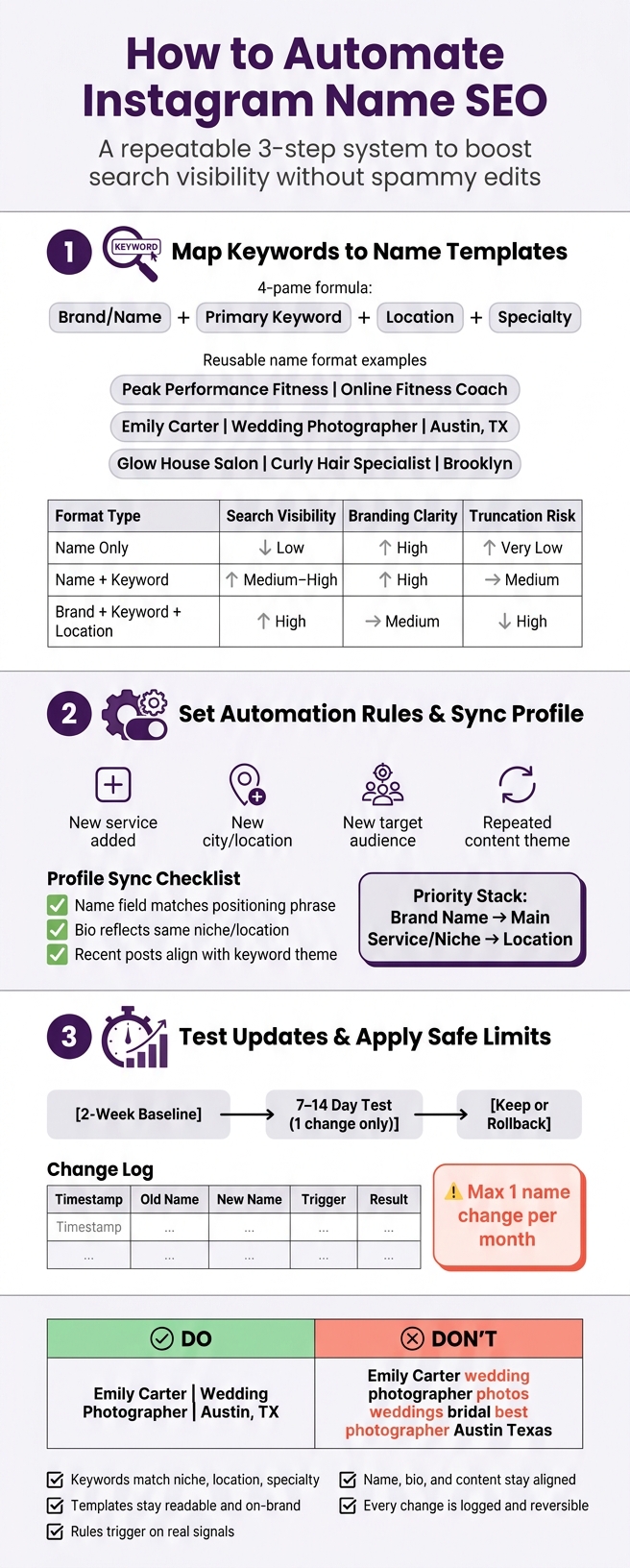
Instagram Name SEO: 3-Step Automation Workflow
Quick Comparison
| Approach | Search Help | Readability | Risk of Looking Spammy | Best Use |
|---|---|---|---|---|
| Name only | Low | High | Low | Personal brands with strong direct traffic |
| Name + keyword | Medium to high | High | Low | Most creators and service businesses |
| Brand + keyword + location | High | Medium | Medium | Local businesses |
One stat matters more than the rest here: changing too often can hurt more than help. That’s why I’d treat this like a monthly test cycle, not a daily tweak.
sbb-itb-3c55afb
Step 1: Map Keywords to Name Templates
Start with a simple keyword map that uses four fields: base_name, primary_keyword, location, and specialty. Keeping these pieces separate makes later edits much easier. You can swap one field without messing up the full name format.
Choose Core, Location, and Specialty Keywords
Your base_name should be your real name or brand name. Keep it the same across every template.
Your primary_keyword is the main search phrase that explains what you do, like "online fitness coach", "wedding photographer", or "hair salon." Go narrow here. "Fitness" is too broad. "Online fitness coach" is closer to how people search.
For location, use a City, ST format, such as "Austin, TX", when local search matters. If your audience isn't tied to one place, leave it out.
For specialty, add the niche that sets you apart, such as "curly hair specialist" or "destination wedding photographer."
A good place to find these terms:
- your bio
- captions
- Highlights
- hashtags
- Instagram auto-complete
These fields become the fixed inputs for your rule presets.
Turn Keywords into Reusable Name Formats
Once you have the fields mapped, turn them into a few reusable templates. In most cases, these three formats do the job:
- "Brand Name | Primary Keyword" - a good fit when brand recognition matters more than location, like Peak Performance Fitness | Online Fitness Coach.
- "Name | Profession | City, ST" - a strong option for local pros, like Emily Carter | Wedding Photographer | Austin, TX.
- "Brand | Specialty + Primary Keyword | Location" - works well for local businesses with a clear niche, like Glow House Salon | Curly Hair Specialist | Brooklyn.
Before you lock one in, give it a quick gut check. Does it sound natural? Is the keyword close to the front? Are the separators clean? Will it fit on mobile without getting chopped off? Save each format as a preset your rules can use later.
Compare Name Format Options Before Automating
| Format Type | Search Visibility | Branding Clarity | Local Discovery Value | Mobile Truncation Risk |
|---|---|---|---|---|
| Name only (e.g., "John Doe") | Low | High | Very low | Very low |
| Name + Keyword (e.g., "John Doe | SEO Expert") | Medium to high | High | Low to medium | Medium |
| Brand + Keyword + Location (e.g., "Doe Media | SEO | NYC") | High | Medium | High | High |
The "Brand + Keyword + Location" format often gives you the strongest local discoverability, but it also has the highest truncation risk. For a lot of accounts, "Name + Keyword" is the safest starting point. It gives you a solid mix of search visibility and readability.
Pick ONE format now and use it as the default for your automation rules in Step 2. That way, Step 2 can apply the same structure every time.
Step 2: Set Automation Rules and Profile Sync
Now that your keyword map and name format are set from Step 1, the next move is simple: turn them into rules for when the name field should change.
Define Rules for When the Name Should Change
Use clear positioning shifts as your triggers. Good examples include:
- adding a new service
- moving into a new city
- changing who you want to reach
- seeing the same topic show up again and again in your content
The key is to base updates on patterns that last, not short-term swings.
If more than one keyword could fit in the name field, use a simple priority stack: brand name first, then your main searchable service or niche, then location. When space gets tight, keep the term with the most search value.
For example, "Atlas Dental | Invisalign" is cleaner than "Atlas Dental | Cosmetic | Family | Invisalign". It keeps the brand clear and holds onto the term people are most likely to search for, without stuffing the field.
Once you've picked the trigger and keyword order, make sure the rest of the profile matches. Otherwise, the update can send mixed signals.
Sync the Name Field with Bio and Content
Use a short positioning phrase that shows your current focus, like "bridal hair Dallas" or "ecommerce email marketing." Before a name update goes live, check that this phrase lines up with your bio, your account category, and your recent post themes.
Here’s the issue: if your bio says "Med spa in Miami" and your recent posts are all about injectables and skincare, but your name field still shows only your brand name, your profile sends a weaker search signal. The pieces don’t support each other.
If those elements don’t point in the same direction, wait on the update until they do. And don’t let one random post make the call. Repeated content patterns should decide it.
Then you can test whether that aligned profile leads to better search visibility.
Use Analytics to Improve Rule Quality
Track each update so you can make your rules better over time. Look at whether a name change connects with:
- more profile visits
- better search visibility
- stronger Instagram growth
Change one term at a time. That way, you can tell what actually caused the result.
If a location phrase like "Brooklyn" brings in more local profile visits, that’s a good sign to keep it. If a niche term helps follower growth but lowers profile visits, you may need to adjust the balance.
UpGrow's real-time analytics can help identify which niche or location terms drive profile visits and follower growth.
Step 3: Test Updates and Apply Safe Limits
Once your rules and sync logic are set, the last step is simple: make sure every automated name change is tracked, measured, and easy to undo if things go sideways.
Test One Name Change at a Time
Start with the strongest rule from Step 2 and roll it out in a controlled way. Keep the profile unchanged for 2 weeks. Then test one name-field update for 7–14 days while leaving everything else the same.
That way, you can tell what actually caused the result.
If the new version beats your baseline for the entire test window, keep it. If it lowers visits, growth, or clarity, roll it back.
It also helps to keep name edits rare. Changing them too often can lead to short-term limits and dips in search visibility. A more careful approach works better here. Monthly changes, or updates tied to a new service launch, tend to protect both search performance and follower trust better than swapping keywords every week.
Log Every Change and Keep Rollback Options
Write down the exact template and trigger for each test so your comparisons stay clean. Log:
- Timestamp
- Old name
- New name
- Trigger
- Result
Also keep the last stable name in that log. If a new version underperforms, you should be able to switch back within hours. If a change causes a major drop in profile visits over 3–5 days, revert to the previous stable version right away and record that in the log.
Compare Manual Updates, Automated Rules, and Risk Levels
Use your test data to decide whether a rule should stay manual or run on its own.
Manual updates make sense for occasional campaigns. Rule-based automation fits accounts that need repeatable updates, but it still works best when changes happen monthly or around a campaign.
Automation also works better when a person reviews things before changes go live. UpGrow can support that setup with real-time analytics and compliant automation settings.
Conclusion: Build a Simple, Compliant Workflow
After testing and planning for rollbacks, keep the final workflow simple. At its core, it comes down to four choices: use a stable brand name, pair it with relevant keywords, and make updates only when your offer, audience, or location changes.
Long-term performance comes from stability, relevance, and compliance. That steady approach helps keep the name field useful for Instagram SEO without sliding into spam. Stick to no more than one major name change per month so things stay consistent and predictable.
Use compliant API-based tools, written rules, and firm limits. Leveraging free Instagram tools can help streamline this process safely.
A final checklist helps keep the workflow honest:
- Keywords: match your niche, location, and specialty
- Templates: stay readable and on brand
- Rules: trigger on real signals
- Profile: keep name, bio, and content aligned
- Changes: log and roll back every update
Make small changes, measure the results, and roll back losers fast. Automation should help discovery, not replace judgment.
FAQs
How do I choose the best keyword for my Instagram name?
Choose a keyword that tells people what you do, who you help, or the kind of value you offer, not just your brand name. A simple format that works well is Brand Name | Primary Keyword.
You can also add niche phrases, location terms, or audience labels that your target followers might search for. Before you lock it in, check that the keyword is clear, easy to search, and not just a vague slogan.
Should I include my city in my Instagram name field?
Yes - if your city fits your niche or the people you want to reach.
Instagram search can give weight to profile keywords. So adding a location next to your brand name or main specialty may help more people find you in local searches.
UpGrow also offers AI-powered profile optimization tools, with suggestions tailored to your target location and audience preferences.
What metrics should I track after a name change?
After changing your Instagram name for SEO, keep an eye on whether those new keywords are bringing in the right people - and whether those visitors turn into followers or leads.
Watch a few key signals:
- Profile visits
- Bio link click-through rate
- Net follower growth
You can also use UpGrow’s real-time analytics dashboard to track these numbers alongside engagement trends. That gives you a clear read on whether your profile optimization is leading to measurable results.