Banner discount confetti

All plans are now60% OFF for a limited time!

Loading...
Banner discount confetti
UpGrow logo iconUpGrow logo text+ GPT-5
PricingReviews
Log inStart for free
  1. Home
  2. Blog
  3. How to View Instagram Highlights Anonymously in 2026 (Without Them Knowing)

How to View Instagram Highlights Anonymously in 2026 (Without Them Knowing)

Three ways to view public Highlights anonymously: Airplane Mode, a secondary account, or browser viewers. Private accounts can't be viewed.

IG Marketing
•Published on July 11, 2026Last updated on July 15, 2026•6 min read • Finish by •
PrivacySocial MediaTechnology

Table of contents

  1. How to View Instagram Stories Without Being Seen (Full Guide)
  2. Method 1: Try Airplane Mode for a One-Time Highlight Check
    1. Method 2: Use a Secondary Instagram Account to Separate Your Identity
      1. Method 3: Use a Browser-Based Instagram Highlight Viewer
        1. Choose the Right Method Based on Your Situation
          1. FAQs
            How to View Instagram Highlights Anonymously in 2026 (Without Them Knowing)

            Yes - you can view Instagram Highlights without tying the view to your main account, but only on public profiles. In this article, I break down the 3 methods that people use in 2026: Airplane Mode, a second account, and browser-based viewers.

            Here’s the short version:

            • Airplane Mode can work for a one-time check, but only if the Highlight loads first.
            • A second account hides your main identity, but your view is still visible to the account owner.
            • Browser-based viewers are usually the best pick for public Highlights, but they do not work on private accounts and some may track data or show ads.

            One key fact: if you watch a Highlight in the Instagram app as normal, your view is visible. And if an account is private, none of the no-login browser tools can show its Highlights.

            Quick Comparison

            Method Public Accounts Private Accounts Can the owner link the view to you? Main issue
            Airplane Mode Yes No Sometimes Can fail if content is not cached
            Second Account Yes Yes, if accepted Yes, to that account Not anonymous
            Browser Viewer Yes No No Instagram account linked Ads, tracking, tool failures

            If you want the plain answer: for public Highlights, browser viewers are usually the top choice; for private profiles, there is no anonymous method.

            How to View Instagram Highlights Anonymously: 3 Methods Compared

            How to View Instagram Highlights Anonymously: 3 Methods Compared

            How to View Instagram Stories Without Being Seen (Full Guide)

            For a faster solution, you can use an anonymous Instagram story viewer to check public profiles instantly.

            sbb-itb-3c55afb

            Method 1: Try Airplane Mode for a One-Time Highlight Check

            Airplane Mode is a short-term workaround for a one-time check. It can work, but it’s hit or miss because Instagram needs to cache the Highlight first.

            Step-by-step: preload the profile, go offline, and close the app

            The sequence matters here:

            1. Open Instagram and go to the public profile you want to check.
            2. Wait for the profile and Highlight thumbnails to fully load.
            3. Turn on Airplane Mode and make sure both Wi-Fi and cellular data are off.
            4. Watch the Highlight while offline.
            5. Force-close Instagram before turning Airplane Mode off.

            If the Highlight wasn’t cached before you went offline, this won’t work.

            When airplane mode works and when it fails

            This method only works when the Highlight fully loads before you disconnect. If Instagram doesn’t cache it, the offline view will fail.

            There’s also another catch. Instagram may sync your view after you reconnect. That’s why force-closing the app before going back online matters.

            Use this as a one-off trick, not something you count on again and again.

            Best use case: one public Highlight check

            This method makes the most sense for a single public Highlight check.

            If it doesn’t work, or if you want something more dependable, use a secondary account next.

            Method 2: Use a Secondary Instagram Account to Separate Your Identity

            A secondary account, sometimes called a burner account, is not anonymous. It simply keeps your main profile out of the viewer list. The person who owns the Highlight can still see that an account viewed it - they just won’t know it was your main one. So this method is for hiding your main identity, not for staying fully unknown.

            How a second account limits exposure but does not make views anonymous

            Instagram logs Highlight views by account handle. That means the username you're signed into is the one the creator sees. So while a second account keeps your primary profile off that list, it does not hide the view itself.

            How to set up a secondary account without drawing attention

            An empty profile can look odd. If you want the account to blend in, give it a normal-looking setup:

            • Use a separate email address with no tie to your primary account. This helps reduce contact syncing and account suggestions.
            • Pick a neutral username that doesn’t point back to your real name or brand.
            • Add a photo and a few posts.
            • Don’t link the account to your main profile or real contacts, or you could appear in Instagram suggestions on the target’s profile.

            One catch: private profiles still need approval. So this works best for public Highlights.

            If you need the view to stay off Instagram entirely, use a browser-based viewer next.

            Method 3: Use a Browser-Based Instagram Highlight Viewer

            For public Highlights, browser-based viewers are the most hands-off option. You can check public Highlights without using your Instagram account. If your goal is to avoid showing up in the viewer list, this is usually the cleanest route.

            How browser-based Highlight viewers work on public accounts

            At a basic level, these tools pull public profile data through a third-party site, so your Instagram account isn't part of the process. That matters if you want no trace tied to your profile.

            In plain English, you type in a public username, and the tool shows that account's active Highlights right in your browser.

            Main limits: private accounts, downtime, ads, and incomplete loading

            The biggest catch is the account's privacy setting. These tools only work for public profiles. They can't get into private accounts. If the profile is private, you'll usually get an error or a "no content found" message.

            There's another issue too: free viewers can be hit or miss. Some are packed with ads. Some only load part of the content, especially older items. And because Instagram changes its platform on a regular basis, these services can stop working with no warning or show old results when they run into rate limits or platform changes.

            Privacy risks to know before using third-party viewers

            Never enter your Instagram password to prevent an Instagram hack. A legitimate viewer should only ask for a username or profile link.

            A few things to watch for:

            • Some sites may track IP addresses or use cookies
            • Some run without a visible privacy policy or contact page
            • Login prompts are a red flag if you're only trying to view public content

            Use private browsing, skip any site that asks you to log in, and share as little as possible.

            That makes browser viewers a good fit for quick checks on public profiles.

            Choose the Right Method Based on Your Situation

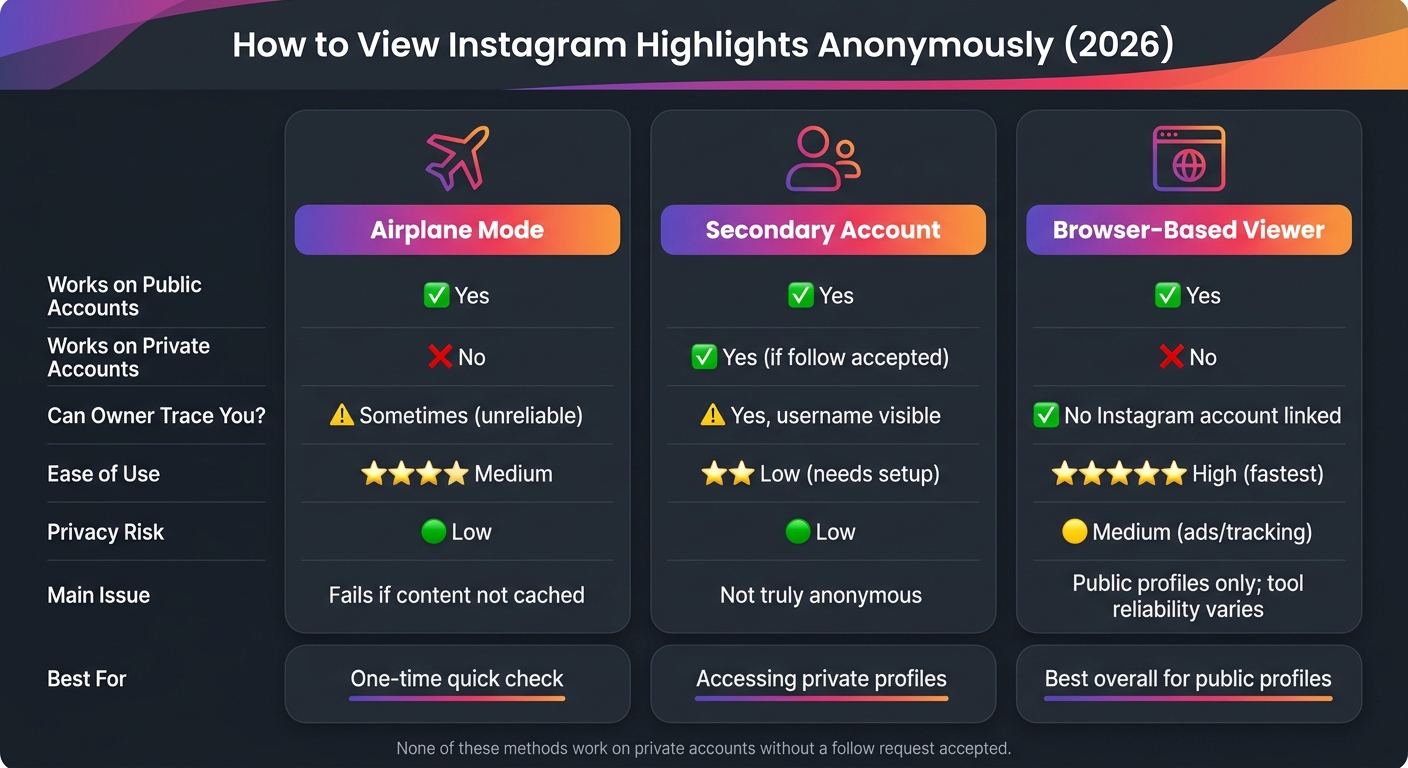
            Use the chart below to pick the safest option for public Highlights. If you just need a fast call, the table gives you the short version.

            Quick comparison: speed, anonymity, account type, and privacy risk

            Method Works on Public Accounts Works on Private Accounts Owner can trace you? Ease of Use Privacy Risk
            Airplane Mode Yes No Partial, unreliable Medium Low
            Secondary Account Yes Yes (if accepted) Low; username visible Low; needs setup Low
            Browser-Based Viewer Yes No Highest here High Medium (ads/tracking)

            The basic tradeoff is pretty simple:

            • Want speed? A browser-based viewer is usually the fastest path for public Highlights.
            • Want account access, including private profiles? A secondary account can work, but only if the follow request is accepted.
            • Want a lower-profile option? Airplane Mode or a secondary account may fit better, though each comes with limits.

            Bottom line: the safest choice for public Highlights

            For public Highlights, browser-based viewers are usually the most reliable way to stay anonymous. That said, private accounts are still off-limits, and free tools can be hit or miss.

            FAQs

            Can Highlights show my view later?

            No. If you use a third-party anonymous viewer, your view will not show up later for the account owner.

            Here’s why: you’re watching the Highlight through an outside service, not through your own Instagram account. So as long as you don’t use your official Instagram account, the owner won’t know you viewed it.

            Are browser viewers safe to use?

            Generally, yes - if they don’t ask for your Instagram login and only pull public content.

            That said, safety and reliability can vary a lot. Some tools are privacy-focused and straightforward. Others can feel outdated, stuffed with ads, or just plain slow.

            A little caution goes a long way:

            • Avoid suspicious downloads
            • Keep your security software on
            • Pick services that clearly say they only access public content

            If a tool asks for your login details, that’s a red flag.

            Why doesn’t anonymous viewing work on private accounts?

            Anonymous viewing tools rely on public data. That means they can only show content that Instagram already makes visible to everyone.

            If an Instagram account is private, only approved followers can see its posts, stories, and highlights.

            So while these tools may look convenient, they can’t get around Instagram’s privacy settings. They don’t have a back door into private stories or highlights. If the content isn’t public, they can’t fetch it.

            Related Blog Posts

            • Instagram Story Viewer: Anonymous Story Viewer for Private Accounts (2025 Working)
            • How to View a Private Instagram Account in 2026 (What Actually Works - and What's a Scam)
            • How to See Anonymous Instagram Story Viewers in 2026 (View Stories Without Being Seen)
            • How to View Instagram Highlights Anonymously in 2026 (Without Them Knowing)

            Share this postHow to View Instagram Highlights Anonymously in 2026 (Without Them Knowing)

            • Twitter
            • Facebook
            • LinkedIn

            4.98 /5 - from 58k reviews

            Buy real Instagram followers, likes & views.
            Instant delivery, guaranteed.

            Trusted by 50,000+ creators — get real engagement delivered to your profile in minutes, not days.

            Buy Instagram Followersor Likes →Views →

            Related posts

            How to Use Instagram's New 'Broadcast Channels' Feature
            IG Marketing
            •December 19, 2024

            How to Use Instagram's New 'Broadcast Channels' Feature

            Ready to use Instagram's 'Broadcast Channels'? Our guide makes it easy to engage your followers. Explore the new feature now!

            Top Instagram Engagement Strategies for 2025
            IG Marketing
            •December 6, 2024

            Top Instagram Engagement Strategies for 2025

            Master Instagram engagement in 2025 with these top strategies. From Reels to UGC, find out how to captivate your audience. Get started today!

            The Ultimate Social Media Workflow for Instagram Influencers
            IG Marketing
            •November 24, 2023

            The Ultimate Social Media Workflow for Instagram Influencers

            In this guide, we will delve into the ultimate social media workflow for Instagram influencers, covering everything from setting up your profile to managing brand partnerships.

            UpGrow logo icon
            UpGrow logo text

            © 2026 UpGrow Agency.
            All rights reserved.

            All Systems Operational
            Products
            • Instagram Growth Service
            • Buy Instagram Followers
            • Buy Instagram Likes
            • Instagram Likes Buying Guide
            • Buy Instagram Views
            • ChatGPT for Instagram
            • Find Influencers — New
            • Perks & Discounts
            Company
            • Pricing
            • Reviews
            • Blog
            • About Us
            • Contact Us
            • Affiliate — Earn 40%+

            Compare

            Path Social Alternative

            Nitreo Alternative

            Kicksta Alternative

            Twicsy Alternative

            Buzzoid Alternative

            Poprey Alternative

            View all comparisons

            Free Tools

            Instagram Fake Followers Checker— New

            Engagement CalculatorFollower Count TrackerCaption GeneratorView all Free ToolsFree AI Content Tools
            Buy Instagram Comments·Buy TikTok Followers·Buy TikTok Likes·Buy TikTok Views
            Payment options logos
            UpGrow

            © 2026 UpGrow Agency. All rights reserved.

            Terms of ServicePrivacyService Status
            EnglishEspañolDeutschItalianoFrançaisDanskPolskiRomână
            SPOTS LEFT
            ​HR
            ​MIN
            ​SEC