Instagram hashtags still help people find your posts in 2026 - but only if you use the right ones. I’d keep it simple: use 5–15 niche hashtags, track profile visits, follows, saves, and shares, avoid spammy automation, and treat hashtags as one part of a bigger Instagram system.
Here’s the short version:
- AI hashtag tools help with three jobs: ideas, tracking, and audience targeting
- Niche and local tags often work better than broad tags like
#instagood - I’d build hashtag sets around 3–5 content pillars
- A good test cycle is weekly review and a monthly hashtag audit
- The engagement rate formula is (Likes + Comments + Saves + Shares) ÷ Reach × 100
- Many Instagram accounts land around 1%–3.5% engagement
- You should never share your Instagram password with tools that auto-like, auto-follow, or auto-comment
- Banned or restricted hashtags can hurt reach fast
If you want the article in one sentence: AI hashtag boosters work best when they help you find better tags, connect those tags to follower growth, and keep your account away from risky automation.
A fast way to think about the tool types:
| Tool type | What it does | Best use |
|---|---|---|
| Generator | Suggests hashtags from keywords, captions, or images | Fast post prep |
| Analytics tool | Shows which hashtags lead to reach and actions | Testing and cleanup |
| Growth system | Uses hashtag behavior with audience filters | Follower growth |
I’d also keep one rule front and center: hashtags help discovery, but they do not fix weak posts. Your content, profile, and targeting still decide whether new visitors turn into followers.
With that in mind, this guide walks through setup, targeting, metrics, safe use, and where UpGrow fits.
Free AI Instagram Hashtag Generator (AI Writing Template)
sbb-itb-3c55afb
Types of Instagram AI Hashtag Boosters
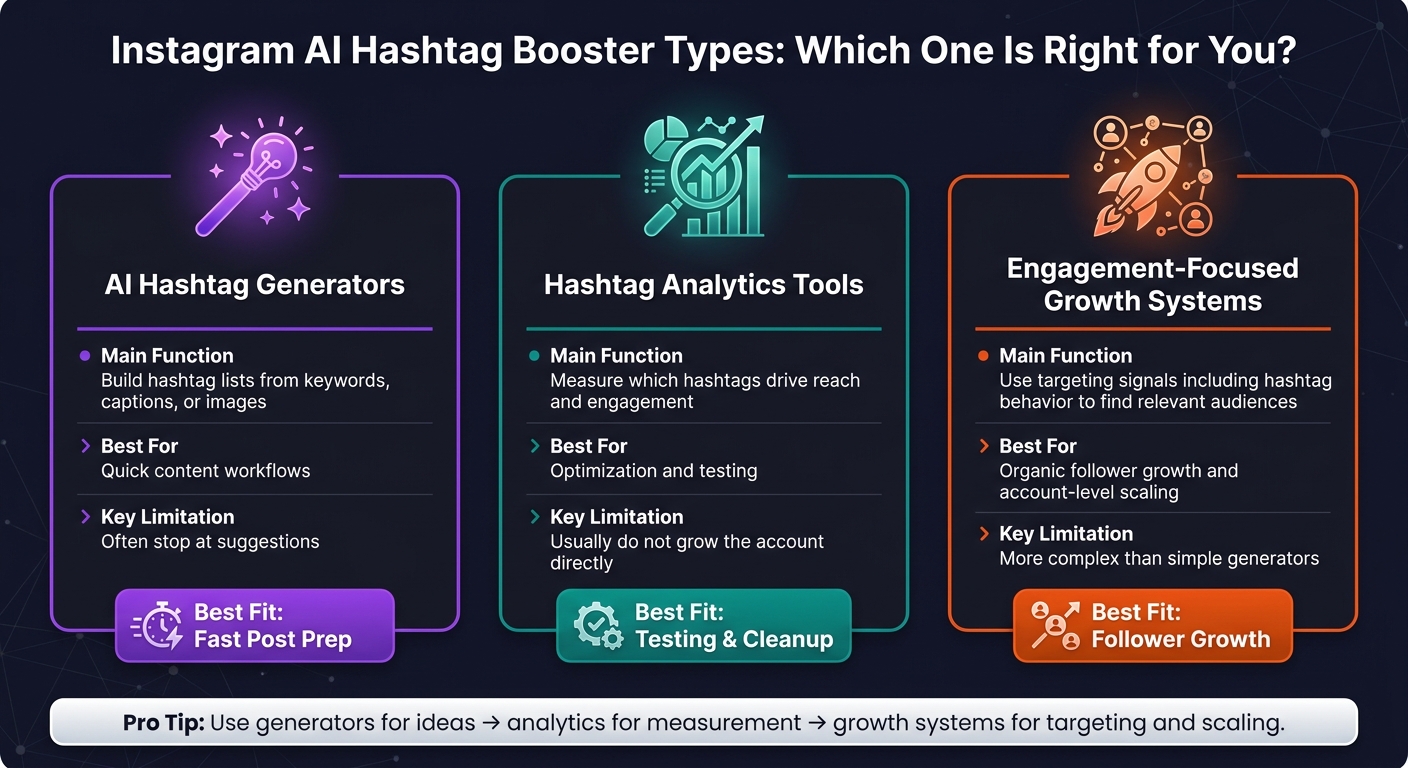
Instagram AI Hashtag Booster Types: Which One Is Right for You?
Instagram AI hashtag boosters usually fall into three buckets: generators, analytics tools, and engagement-focused growth systems.
AI hashtag generators, analytics tools, and engagement boosters
AI hashtag generators take a keyword, caption, or image and turn it into a quick first draft of hashtags. That gives you a starting point for better discovery without much manual work.
Hashtag analytics tools pick up where generators stop. They help you sort hashtags into local, niche, and broad groups, then track what those groups do over 30–60 days. You can compare essential Instagram metrics like reach, saves, profile visits, and follows, cut the hashtags that don't convert, and keep the ones that lead to cleaner follower growth.
Engagement-focused growth systems treat hashtag behavior as a targeting signal, not just a label on a post. So if people often interact with tags like #austinmoms or #austinfitness, the system reads that as a sign of interest and uses it to guide audience discovery. In plain English, hashtags stop being just something you track after posting. They start helping you find the right people.
| Type | Main Function | Best For | Key Limitation |
|---|---|---|---|
| AI hashtag generators | Build hashtag lists from keywords, captions, or images | Quick content workflows | Often stop at suggestions |
| Hashtag analytics tools | Measure which hashtags drive reach and engagement | Optimization and testing | Usually do not grow the account directly |
| Engagement-focused growth systems | Use targeting signals, including hashtag behavior, to find relevant audiences | Organic follower growth and account-level scaling | More complex than simple generators |
The best choice comes down to the kind of account you run.
Where UpGrow fits in a growth stack
For a full growth workflow, UpGrow sits above generators and analytics tools. Instead of only suggesting hashtags or reporting results, it turns hashtag behavior into audience targeting and organic follower growth.
Best fit by account type
A local service business, like a dentist in Austin, Texas, usually needs tight location-based hashtags such as #austindentist. Pair that with a growth system that targets people nearby, and the setup makes a lot more sense.
A lifestyle or niche creator often gets more from interest-based tags like #vanlife or #booktok. In that case, systems that read hashtag behavior across larger interest groups matter more than city-based targeting.
Agencies running many accounts need both precision and scale. That often means building repeatable hashtag frameworks by vertical, then adjusting them for each client’s city and niche. Agency support also helps when those plans need to run across a full client roster.
Once you know which type fits, the next step is setup: building a hashtag library, connecting the account, and training the tool.
How to Set Up an AI Hashtag Booster
Build a hashtag library before using AI
Before you switch on any AI tool, get your hashtag base in order. Start with 3–5 content pillars. These are the main topics you post about again and again. Common examples include "behind-the-scenes", "product features", "customer stories", "education/tips", and "seasonal campaign tags."
Then, for each pillar, research hashtags and save them in separate groups:
| Tier | Post Volume Range | Example |
|---|---|---|
| Niche | 5K–50K posts | #BrooklynBrunchSpots, #AustinCoffee |
| Mid-volume | 50K–500K posts | #NYCBrunch, #ChicagoEats |
| Broad | 500K+ posts | #Food, #Fitness |
| Branded | Any | Your brand name, slogans, or campaign tags |
| Local | Any | #DallasFoodie, #MiamiRealEstate |
For each pillar, keep a library of about 15–20 hashtags. On each post, use roughly 10–15 hashtags, with more weight on niche and mid-volume tags if you want a better shot at reach. It also helps to build seasonal sets for major U.S. shopping periods. Think Black Friday, Cyber Monday, back-to-school, or the holiday rush. Put simply: the better your library, the better the AI output.
Connect your account and train the tool
Once your library is ready, load it into the tool and train it using your brand signals. Most AI hashtag boosters connect through Instagram's official login flow or Meta integration. You sign in through Meta, connect a Business or Creator account, and approve only the access the tool needs: basic profile info, content performance data, and access to hashtags and insights.
A few ground rules matter here. Never share your raw Instagram password with any tool. Turn on two-factor authentication. And check that you can disconnect the account whenever you want.
After that, give the tool seed keywords that describe your brand and niche, such as "organic skincare", "NYC spa", or "Reels tutorials." Paste in past captions that performed well. Upload sample images or Reels that look like your usual content. Then define your target audience by age range, gender, interests, and U.S. location. Set the language to English (United States). The more specific your inputs, the more on-point the hashtag suggestions tend to be.
Set up UpGrow targeting to support hashtag-driven growth
Once your hashtag set is ready, line up your audience filters with those same niche signals. Set filters for age, gender, location, interests, and language. For a local business in Austin, Texas, that might mean women ages 25–40 with an interest in wellness. For a national brand, it may mean focusing on major U.S. metro areas and interest groups that fit your niche.
UpGrow's patented AI and real human specialists then work to engage users who match those filters and are active around hashtags tied to your niche - without bots or fake followers. That gives your hashtag traffic a better chance of reaching real, high-intent profiles who are more likely to turn into followers.
Targeting and Metrics That Improve Results
Target by hashtag behavior, demographics, and location
Once your hashtag library is live, start narrowing your audience with behavior data. This is where things get more practical. Instead of guessing which tags seem good, look at the signals that show how people act after they find your content.
Three signals matter a lot here: save/comment rate (saves and comments per 1,000 impressions on posts using a given hashtag), profile-to-follow rate (how many people visit your profile and then follow after finding you through a hashtag), and best-performing format (whether Reels, carousels, or single images tend to do better under certain tags).
Then layer in location and demographic filters. Match your targeting to the markets already responding to your hashtags. Go after the audience most likely to convert. For U.S. campaigns, use English-language targeting so the traffic stays relevant.
Track the metrics that show hashtag quality
Once targeting is in place, track the tags that lead to action. Profile visits, follows, website taps, saves, and shares tell you far more than impressions and likes alone.
A simple way to sort your hashtags is to put them into two buckets:
- Awareness hashtags: high impressions, low conversions. These work well when the goal is visibility.
- High-intent hashtags: moderate impressions, stronger actions. These are the tags worth protecting and building on.
Saves and shares usually show that the content hit home. Comments show people want to join the conversation around that topic.
Review your posts every week. Then audit your tags on the first business day of each month: keep the top performers, drop the tags that stay weak, and test 5–10 new hashtags per content theme.
Engagement rate gives you a steady benchmark across posts of different sizes. The standard formula is:
(Likes + Comments + Saves + Shares) ÷ Reach × 100
Across industries, Instagram engagement rates often land between 1% and 3.5%. If a certain hashtag cluster is beating that range, it deserves a closer look.
Use UpGrow analytics to connect traffic to follower growth
The next step is tying hashtag traffic to follower growth. UpGrow's live dashboard shows follower growth, profile visits, and engagement in real time, so you can see how different hashtag clusters and audience filters affect results.
Check the dashboard each week and look for the hashtag clusters that keep winning. At the same time, note which audience filters - age, gender, and location - line up with follower spikes. If you're using Boost™, compare the results against your baseline periods to see which themes do best.
The point is simple: move your attention away from surface-level metrics and toward outcome metrics like follows, website taps, and saves. UpGrow's 24/7 monitoring also helps you catch patterns early, like weekend engagement spikes in certain U.S. time zones or metro areas, so you can adjust targeting before the next posting cycle.
Use your strongest clusters to tighten targeting before moving into safe-use rules.
Safe Use, Tool Comparison, Growth Stack Integration, and Key Takeaways
How to use AI hashtag boosters safely and stay Instagram-compliant
After targeting and metrics, the last piece is compliance as you scale.
The main problem is misuse, not the tool itself. Instagram bans automation that mimics human behavior, including auto-following, mass liking, comment bots, and bulk DM outreach. And there’s another trap: even one banned or restricted hashtag can keep a post out of hashtag feeds and Explore, which can cut visibility fast.
Two rules handle most of the danger.
- Never give your password to a tool that says it will like, follow, or comment for you outside Meta’s approved APIs.
- Keep your hashtag library clean. Check for restricted tags before every post, and remove hashtags that keep underperforming.
UpGrow keeps growth organic with patented AI and real-human Instagram experts, without bots or fake followers.
How hashtag boosters fit into a full Instagram growth system
Once safety is handled, the next step is figuring out where hashtag boosters belong in your Instagram workflow.
Hashtags are a discovery layer, not a growth plan by themselves. They help more of the right people find your posts. But that’s only one part of the system. Strong creative and captions get people to stop scrolling and engage. Profile optimization turns those profile visits into follows.
Put simply: use generators for ideas, analytics for measurement, and UpGrow for targeting, profile optimization, and monitoring.
That’s the core idea. Hashtags open the door, but content and profile optimization do the work once someone steps inside.
Conclusion: Key rules for better Instagram results
Match your hashtag sets to your content pillars and audience intent, not just search volume. Track profile visits, follows, saves, and click-throughs, not impressions alone. Use AI for direction, keep strategy human-led, and treat hashtags as one part of the system.
If you want the full setup in one place, UpGrow combines AI targeting, profile optimization, and 24/7 growth monitoring with real-human oversight.
FAQs
How long should I test hashtags before changing them?
Test hashtags for about 7–14 days before you swap them out. That window gives you enough time to spot measurable changes in engagement and reach.
After that, check performance each week, drop the hashtags that aren't pulling their weight, and add new ones as you keep refining your mix.
Which Instagram metrics matter most for hashtag performance?
Prioritize reach, impressions, and engagement rate to measure how many unique accounts you reach, how many total views you get, and how well the content lands with people.
You should also track likes, comments, saves, shares, follower growth, and profile visits or clicks from hashtag-driven traffic. Then compare those numbers by hashtag, post, time frame, and audience segment so you can spot what’s working and adjust faster.
How can I tell if a hashtag is hurting my reach?
Track hashtag performance over time so you can spot drops in reach or impressions, along with tags that lag behind the rest of your hashtag mix. Use analytics to compare results across posts and date ranges.
If a hashtag keeps lining up with flat engagement or lower reach, stop using it. And before you publish, check hashtags with a banned-hashtag checker or filter tool so you can steer clear of banned or spammy tags.